
Digital signage for BLAZE dispensaries
TV menus, self-service kiosks, and promo screens that read live from BLAZE. Products, prices, stock, and specials update on every screen without anyone retyping a thing.
Seed is digital signage for BLAZE dispensaries. TV menus, self-service kiosks, queue boards, and promo screens read products, prices, stock status, and specials straight from BLAZE, so every screen in the store updates itself. Seed runs 6,500+ screens across 950+ dispensary storefronts in 36 states and D.C.

What is BLAZE?
BLAZE is the premier AI-driven platform for cannabis dispensaries, unifying POS, payments, and e-commerce. We automate compliance and streamline inventory while driving revenue through an intelligent company-level promotion engine and loyalty programs. Enhance every visit with interactive, customer-facing displays and AI-powered recommendations that elevate the retail experience.
Learn More About BLAZE Seed in BLAZE's Partner Directory
What is Seed?
Seed is an in-store digital signage application that gives dispensaries the power to connect customers to products they'll love. Seed customer-facing screens help increase retail profits, speed up transactions, decrease wait times, and influence behavior. Modern, innovative dispensary brands trust Seed for all in-store digital needs.
Use Seed with BLAZE to Increase Dispensary Profits
BLAZE Retail for Dispensaries
Designed for budtenders, drivers and front desk personnel, sign up and check out members using the best cannabis POS software.
BLAZEPay
Fully integrated payment platform that increases average cart sizes, eliminates manual entry errors and allows for budtender tipping all while ensuring the merchant gets paid on time, all the time.
BLAZE Insights
BLAZE Insights Standard puts powerful reporting and analytics in one easy-to-use dashboard available to all BLAZE users. BLAZE-powered cannabis retailers can weaponize data to give them a competitive edge.
WHAT SYNCS
Set it in BLAZE. See it on the wall.
Products, prices, stock status, and specials flow from BLAZE to every Seed screen automatically. Sold out? Off the menu before anyone asks for it. New price at the register? On the wall without anyone retyping a thing.
- Products — the menu is your live inventory, not last week's spreadsheet.
- Prices — change it in BLAZE once; every screen follows.
- Stock status — out-of-stock items drop off on their own.
- Specials — the deal you set at the register is the deal the room sees.
GETTING LIVE
Connected once. In sync from then on.
- Connect your BLAZE account in Seed Manager. One-time setup, and we walk you through it.
- Map your menus. Pick what each screen shows — full menu behind the counter, specials up front, whatever fits your room.
- Screens stay in sync. From then on BLAZE drives the wall: products, prices, stock, and specials update automatically. Most stores go from signed to live in about a week.
EVERY SCREEN IN THE STORE
Digital signage that runs on BLAZE data
TV menu signage
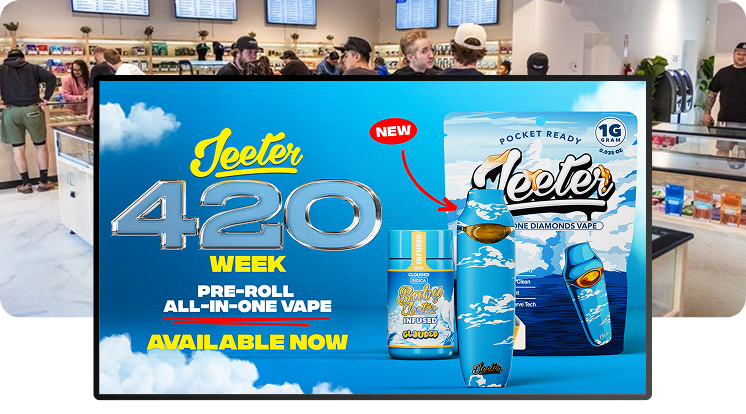
Menu walls that read from BLAZE. Prices, stock status, and specials update themselves.
Learn more →Self-service kiosks
Seed Touch kiosks on the same live feed. White-label, and checkout asks for first name, last name, and phone number.
Learn more →TV queue board
Put the line on screen: next up and order ready, so the room runs itself.
Learn more →Specials and promos
The deal you set in BLAZE is the deal on every screen. Feature it bigger with Seed campaign tools.
Learn more →How the sync layer works, what updates, and how fast: POS sync.
BLAZE questions, answered
What digital signage works with BLAZE?
Does Seed integrate with BLAZE?
What flows from BLAZE to my menus?
Do Seed kiosks work with BLAZE?
Can I show the deals I run in BLAZE?
Do I need to buy new TVs or special hardware?
How long does it take to go live?
Does Seed cost extra per screen?
Trusted by dispensaries across the country, from MSOs to mom-and-pops













GET STARTED
Ready to create the dispensary of your dreams?
Schedule a demo to discuss how our digital signage can be customized to power your perfect store.